
In this article
- Is Ableton Live 13 out yet?
- What's new in Live 13
- ARA 2: Melodyne inside the clip
- Step Sequencer
- Drum Synth and Looplet
- Racks, Macros and Contextual Browsing
- New mixing tools
- Workflow updates
- What is not new
- What Live 13 means for vocal production
- My highlights
- What I'm still missing in Live 13
- Price, editions and upgrades
- System requirements
- Should you buy Live 12 now?
- Videos worth watching
Ableton Live 13 is announced but not released yet. Ableton unveiled it on November 10, 2026, opened a public beta with limited places for owners of Live Standard and Suite, and says the full version arrives in early 2027 (Ableton's Live 13 announcement). The biggest change for anyone who works with vocals is ARA 2: Melodyne and similar tools now open directly on an audio clip. If you are still choosing a DAW, start with our comparison of the best DAWs in 2026.
I work in several DAWs, and Ableton is one of them, mostly for EDM. I have applied for the Live 13 beta but have not tested it yet. So the facts below come from Ableton's own pages, the beta release notes and the first hands-on videos, and my opinions come from producing in Live.
Is Ableton Live 13 out yet?
No. As of November 2026, Live 13 exists as a public beta (build 13.0b25 at announcement) and as a pre-order. Ableton has not named a day, only "early 2027", in its shop, on the Live 13 page and in its help center.
The beta is not open to everyone. Ableton's Live 13 page says there are limited places for Live Standard and Suite owners. Owners of Intro or Lite cannot join the beta.
What's new in Live 13
Ableton lists more than a dozen new features. Here is what they do, based on the official feature page, the Live 13 beta release notes and Ableton's own feature video.
ARA 2: Melodyne inside the clip
ARA lets a plug-in read the whole audio file instead of only the live signal. Until now, Melodyne in Live meant inserting it as an effect and transferring the audio in real time before you could edit a single note. In Live 13 you pick an ARA plug-in from the clip itself, and it edits pitch and timing right there in Clip View.
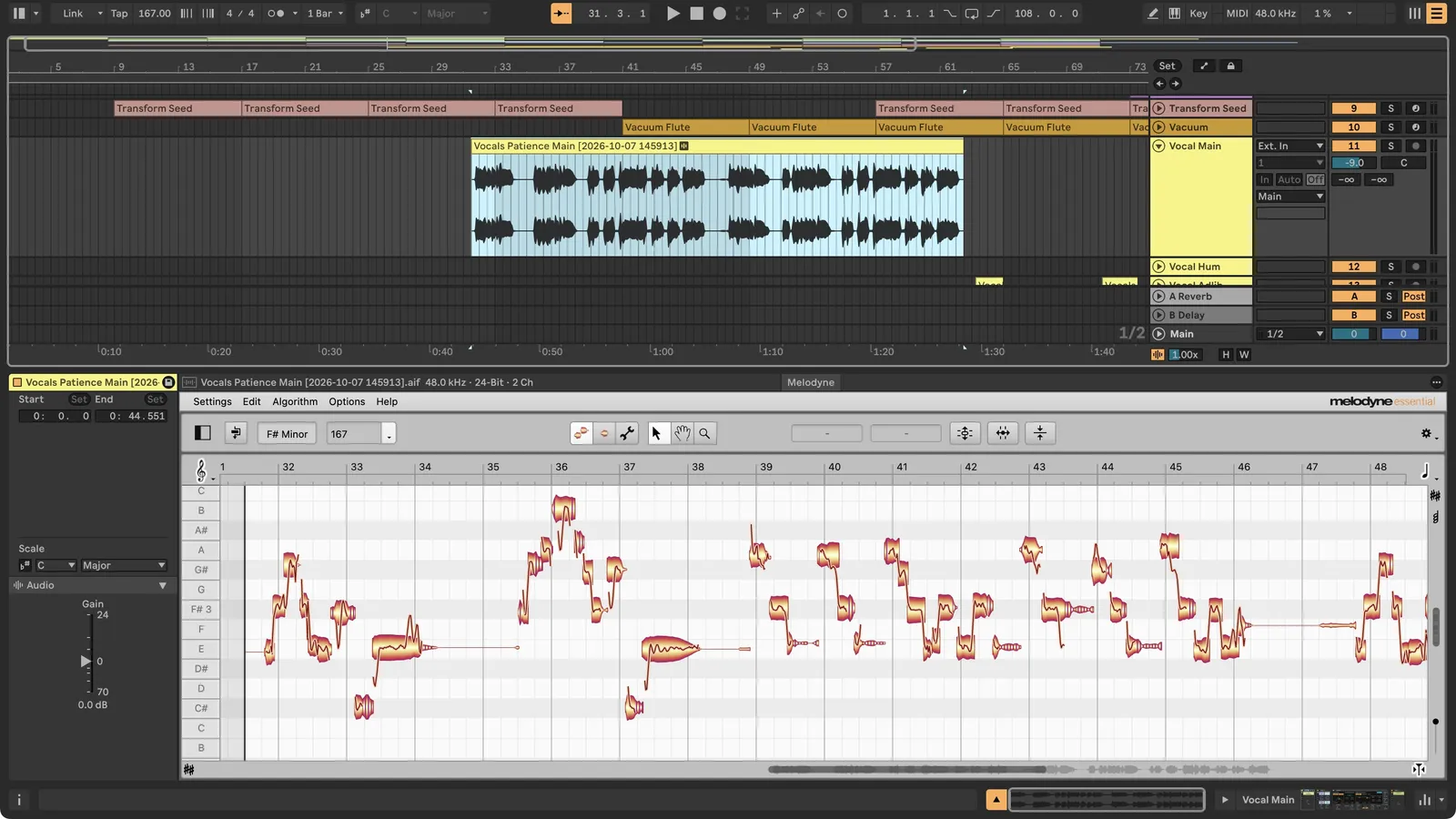 Melodyne essential editing a lead vocal directly in Live's Clip View. Image: Ableton
Ableton names Melodyne, SpectraLayers, RePitch 2 and VocAlign as compatible. When you are done, "Bounce ARA Edits" prints the edits to audio. In Celemony's own first look, the tuning stays attached to the clip: you can shorten a clip, move it to another section or switch takes in the take lanes, and the edits come along (Celemony on YouTube).
Two limits matter. ARA works in Arrangement View only, not in Session View. And the beta notes list known problems with several third-party plug-ins, among them Antares Auto-Tune Pro, iZotope RX, Waves Sync Vx and Celemony's Tonalic.
Step Sequencer
A new clip type sits next to the piano roll. You place notes on a grid and set velocity, offset, length, repeat, pitch and chance per step. Each row can run at its own length, rate and direction, so polyrhythms live inside one clip. You can convert a step clip to regular MIDI notes and back.
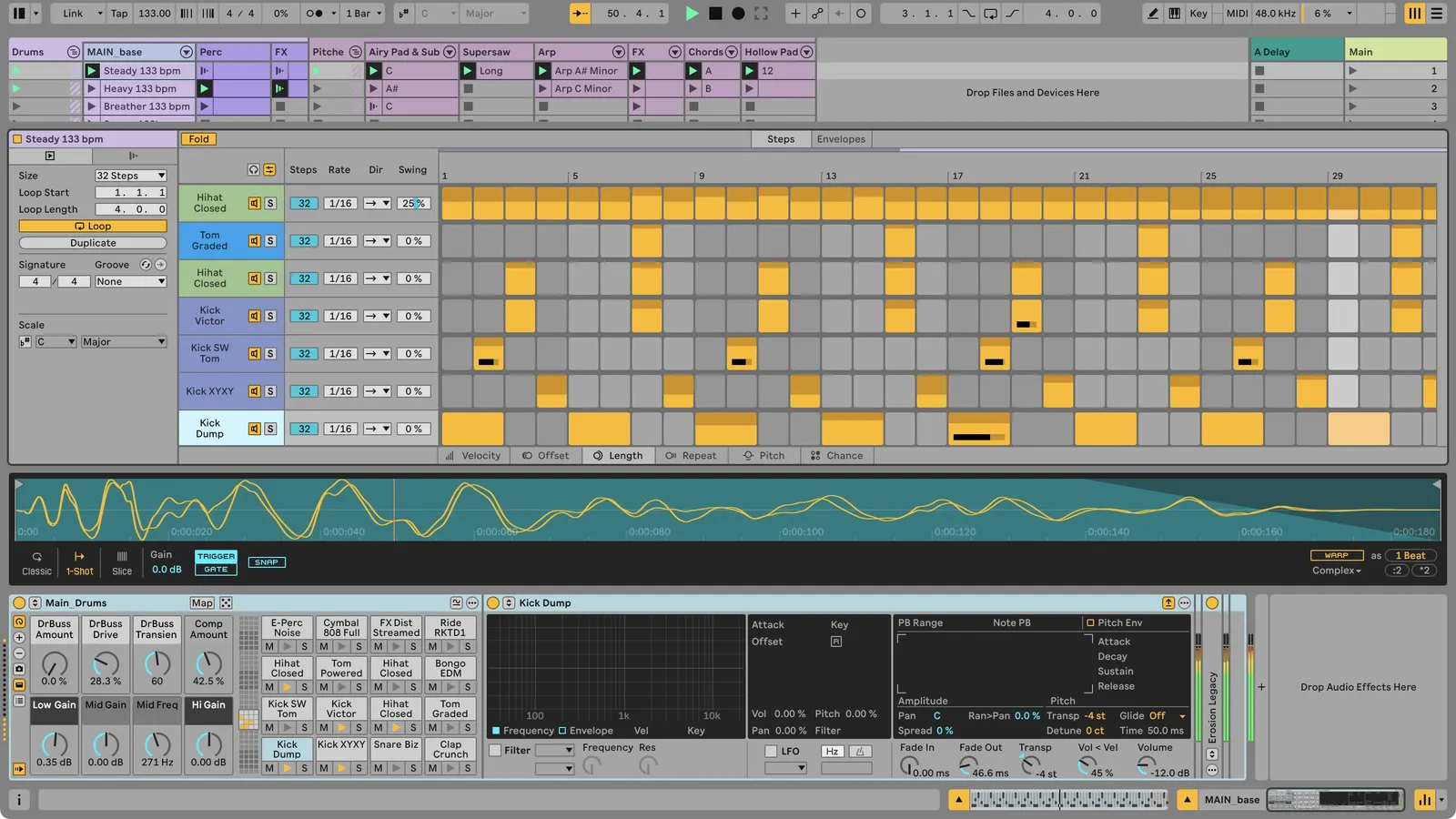 A drum pattern in the Step Sequencer, with steps, rate and swing set per row. Image: Ableton
Drum Synth and Looplet
Drum Synth is a new instrument with more than 20 synthesis models across nine sound types, from kick to FX. Looplet is a Max for Live device in Suite with four playheads that loop and layer parts of one sample, with tape stop, reverse and granular options.
Racks, Macros and Contextual Browsing
Racks get up to 32 Macros, a curve editor per Macro, and a mode that turns Macros into modulators. Two new Rack types split audio by frequency (Multiband Rack, with linear phase filters as an option) or by mid and side signal (Mid-Side Rack). In CDM's hands-on, Peter Kirn sums up the Rack changes with "I don't want to go back to Live 12" (CDM hands-on).
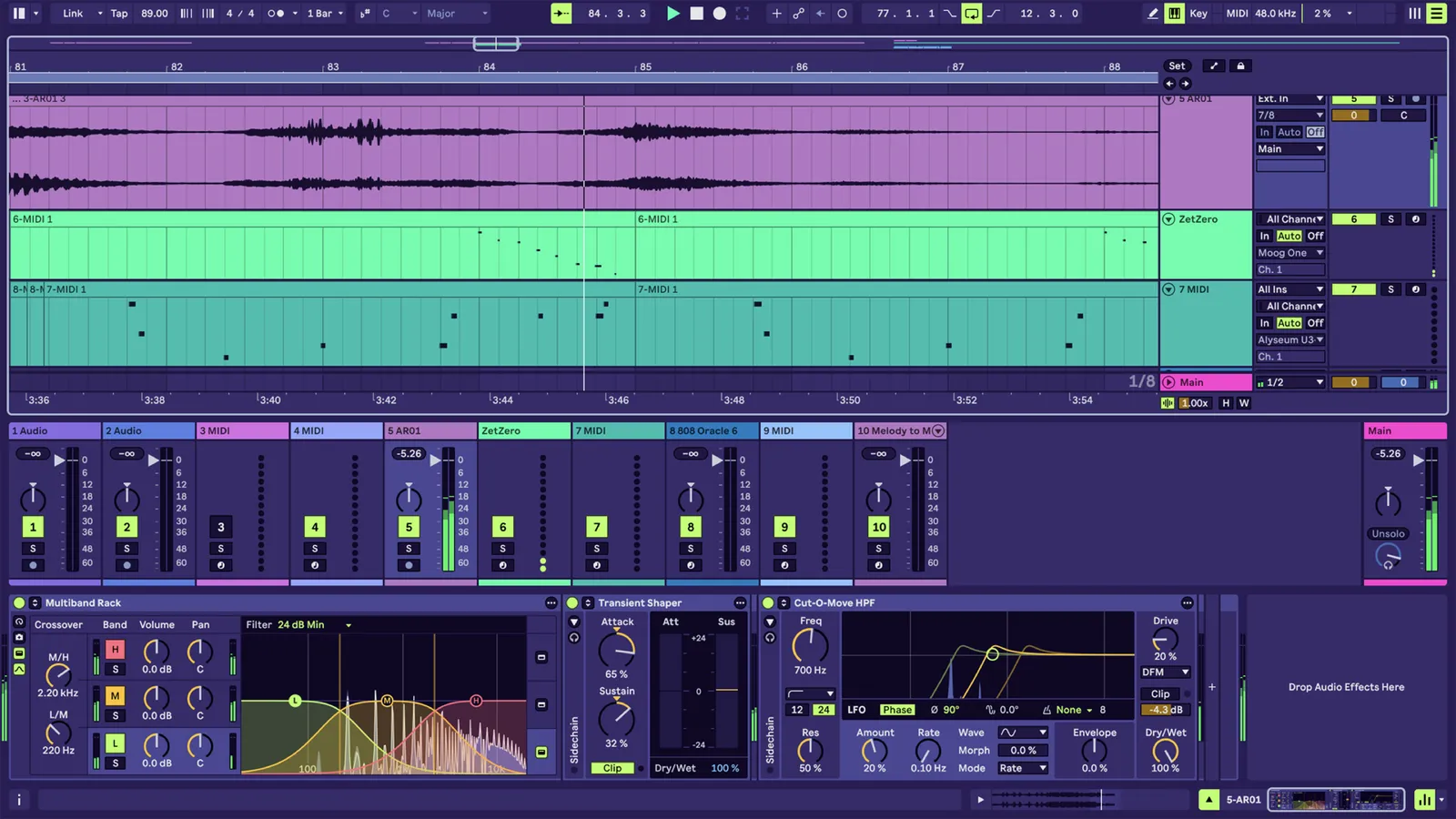 A Multiband Rack with three bands, followed by the new Transient Shaper. Image: Ableton
Contextual Browsing adds a plus button between devices. It shows only what fits that spot in the chain, including AU and VST plug-ins, and swaps presets without opening the browser.
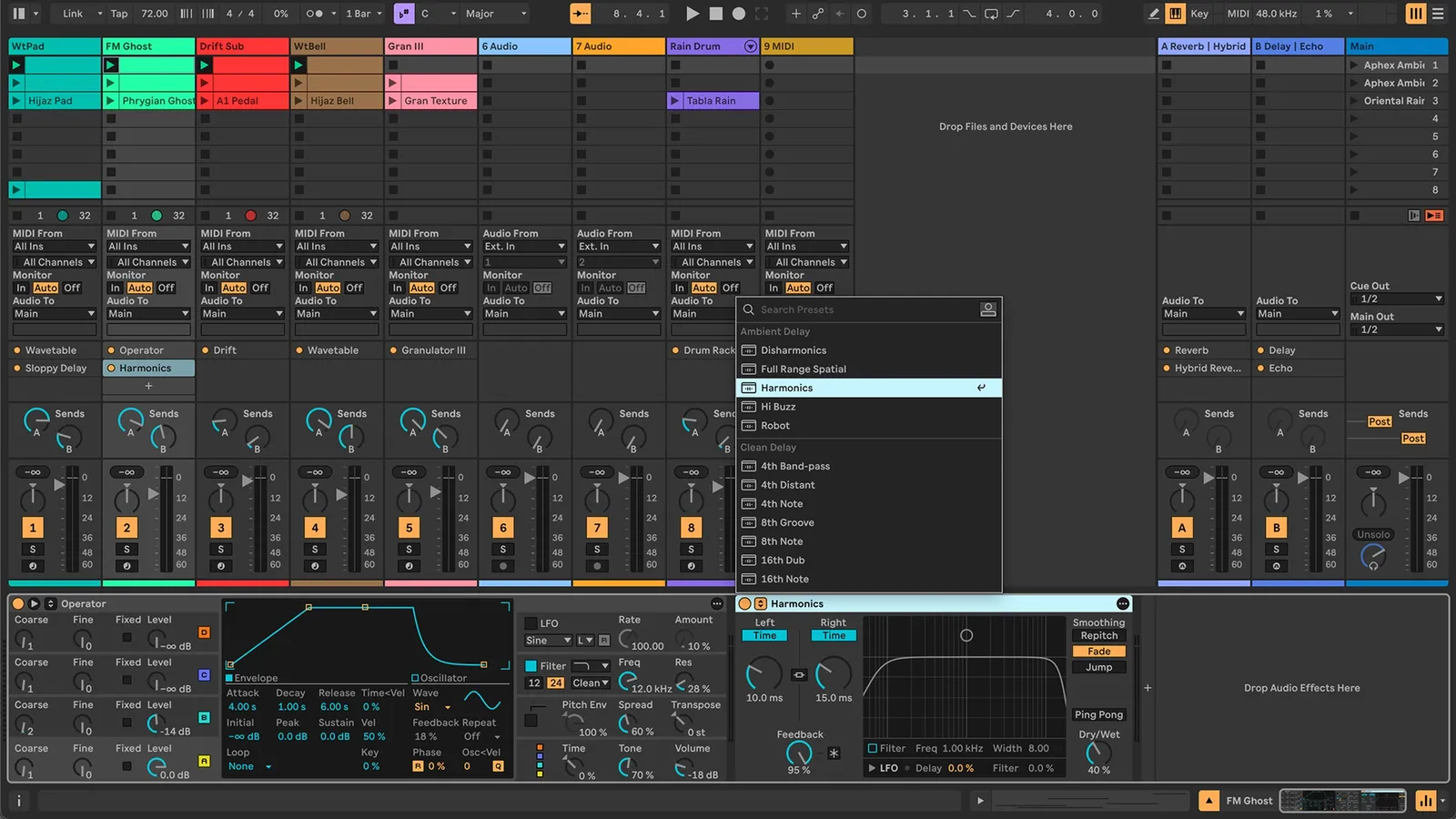 Contextual Browsing opened from the mixer's Device Slots to swap a delay preset. Image: Ableton
New mixing tools
Live 13 Suite adds a Transient Shaper, a Clipper and the Classic Dynamics & EQ Pack by Softube, five devices modeled on studio hardware (FET and Opto compressors plus a British console compressor, EQ and drive). The Core Library gets new Racks for vocals, guitars, mixing and mastering.
Workflow updates
- Capture Automation: the Capture button now records automation moves you made without recording, on every track type.
- Envelope Clips for return tracks: clip-based automation and modulation now reach return tracks too.
- Device Slots: a mixer section that shows every device on every track, with drag and drop.
- Smaller changes: Link can now sync the Arrangement position across a Link session, audio export can include a tempo map, and MIDI export resolution rises from 96 to 480 ticks per quarter note.
What is not new
Some features in Live 13 coverage are older than they look.
- Comping with take lanes arrived in Live 11.
- Auto Shift, Live's real-time pitch correction, came with Live 12.1 in October 2024 and is in every edition.
- Stem separation came to Live 12 Suite with version 12.3 in November 2025. In Live 13 the models download from Ableton at startup instead of shipping with the installer.
Stem separation is useful for remixes and practice, but it does not give you the right to release the vocal of someone else's song. For a vocal you can put out, you buy vocals with a license, or use licensed cover vocals when you want a well-known melody. If you want to know what you get in a stem package, read what vocal stems are and how producers use them.
Also not in Live 13: a subscription and generative AI. Live is still a one-time purchase, and the feature list has no AI assistant or AI music generation. The YouTube channel Low Heat Beats counts both as wins in its first video on Live 13 (Low Heat Beats on YouTube).
A few things go away. The older Max for Live "DS" drum devices no longer appear in the browser, though existing Sets still load them. Around 1,700 presets from Live 12.4 are missing from the beta and will return in legacy folders, according to the release notes.
What Live 13 means for vocal production
What I like about Live for EDM vocals is the device chain. Effect Racks and the chain at the bottom of the screen keep the whole vocal processing on one track. I don't need a pile of extra mixer tracks and sends, and that makes it very clear what happens to the vocal at each step.
The weak spot was tuning. Missing ARA support for Melodyne was a big minus for Live, while other DAWs had it for years. Studio One, now called Fender Studio Pro, is where ARA debuted in 2011 (Celemony), and that is where I do my vocal editing today. So it is good to see Ableton catch up.
In practice the change is speed. You can tune one of your house vocals, move the chorus to the second drop and keep every correction, without a transfer pass or a second window. Auto Shift, Live's own pitch corrector since 12.1, still handles quick tuning without a third-party plug-in, and the Core Library adds new Racks for vocals. For the processing chain after the tuning, see our guide to mixing vocals, and for slicing a vocal into rhythmic parts, how to make vocal chops in any DAW.
My highlights
For me the Multiband Rack and Contextual Browsing are the features that matter. Contextual Browsing is the one I look forward to most: loading a plug-in exactly where it belongs in the chain is a small thing that changes every session. I also like that the mixer gets easier to read with Device Slots. Clipper and Transient Shaper are nice to have, but to be fair, established producers already own plug-ins for both.
What I'm still missing in Live 13
What keeps pulling me away from Live are banal things, and Live 13 does not touch them.
- Plug-in delay compensation. I like to produce into a master chain. With a lot loaded on the master, I press play and what I hear is slightly behind what I see. Sidechains that depend on exact timing can be off as well. Neither the feature list nor the beta release notes mention changes here.
- Sidechaining. It always has to run through a MIDI or audio source and does not simply work with automation.
- Sample replacement. I can't replace a sample by dragging a new one on top of it, which FL Studio and Fender Studio Pro both do. When you audition twenty kicks for an EDM track, that adds up.
None of this is a dealbreaker on its own. Together it is why I don't make Live my only DAW.
Price, editions and upgrades
| Intro | Standard | Suite | |
|---|---|---|---|
| Price in Ableton's euro shop | 99€ | 279€ | 599€ |
| Audio and MIDI tracks | 16 | Unlimited | Unlimited |
| ARA 2, Step Sequencer, Drum Synth, new Racks | Yes | Yes | Yes |
| Transient Shaper, Clipper, Looplet, Softube pack | No | No | Yes |
| Melodyne essential and Max for Live | No | No | Yes |
Live 13 Intro costs 20€ more than Live 12 Intro (79€). Standard and Suite keep their Live 12 euro prices. Ableton shows prices in your local currency, so check the shop for dollars or pounds.
Until Live 13 is released, all Live 12 editions and upgrades are 20% off, and every Live 12 license bought or registered in that period gets the matching Live 13 edition for free (Discount Campaign FAQ). Live 12 Suite owners can pre-order Live 13 Suite at 20% off. Ableton charges the pre-order the day before release, and you can cancel until then. Upgrade prices only show up after you log in. Synth Anatomy reports 199€ for Live 12 Suite to Live 13 Suite, or 159€ with the pre-order discount (Synth Anatomy).
System requirements
| Live 12 | Live 13 | |
|---|---|---|
| Windows | Windows 10 (22H2) or 11 | Windows 11 (24H2 or later) |
| macOS | 11.7.10 Big Sur or later | 14.8.9 Sonoma or later |
| Mac processor | Intel Core i5 or Apple silicon | Intel Core i5 or Apple silicon |
| RAM | 8 GB | 8 GB |
Source: Ableton's minimum system requirements. If your studio computer still runs Windows 10 or macOS Ventura, Live 13 will not install until you update the system.
Should you buy Live 12 now?
If you were going to buy Live anyway, the math is simple: Live 12 at 20% off includes Live 13 on release day. If you are deciding between DAWs, read how Ableton compares to FL Studio first, because Live 13 does not change Live's basic character.
I'm thinking about buying it anyway, because switching DAWs now and then keeps me inspired. Fender Studio Pro is the fastest workflow I have found, with macros and a shortcut for almost everything. In Live I'm a little more limited and click more, which sounds like a downside. But it makes me think about each move, and my mixes feel cleaner for it. In Studio Pro I'm so tuned for speed that I sometimes think less. For me personally, that is a real benefit of Live.
If you produce EDM and like to build your sound in chains, Live 13 looks like a strong update. If you mix into a heavy master chain or rely on tight sidechain timing, keep an eye on how Live 13 behaves there before you switch.
Videos worth watching
- Ableton, "What's new in Ableton Live 13? Feature Overview": the official 13-minute tour. ARA starts at 1:10.
- Celemony, "First Look: Melodyne with ARA in Live": six minutes on what clip-based tuning changes for vocals (watch).
- Sonic Academy, "Ableton Live 13 First Look": an Ableton Certified Trainer goes through Racks, Clipper and the Step Sequencer. The Mid-Side Rack starts at 6:41.
- Seed To Stage, "Finally! Ableton Live 13's Step Sequencer Is Here": the deepest look at the sequencer so far (watch).
Frequently asked questions
When is Ableton Live 13 released?
Ableton says Live 13 will be released in early 2027. It was announced on November 10, 2026 and is in public beta now, with limited places for owners of Live Standard and Suite.
How much does Ableton Live 13 cost?
In Ableton's euro shop, Live 13 Intro costs 99€, Standard 279€ and Suite 599€. Prices vary by country, and owners of an older version see their upgrade price after logging in to their Ableton account.
Do I get Live 13 for free if I buy Live 12 now?
Yes. Every Live 12 license or upgrade bought during the announcement campaign includes a free upgrade to the same Live 13 edition on release day. Live 12 is 20% off until Live 13 comes out.
Does Ableton Live 13 support Melodyne?
Yes. Live 13 supports ARA 2 in all editions, so Melodyne opens directly on an audio clip without transferring audio first. ARA works in Arrangement View only, and Live 13 Suite includes a Melodyne essential license.
Does Ableton Live 13 run on Windows 10?
No. Live 13 needs Windows 11 version 24H2 or later, or macOS 14.8.9 Sonoma or later. Live 12 still ran on Windows 10 and macOS Big Sur. Intel Macs remain supported.
Does Live 13 have AI features?
Live 13's feature list has no generative AI and no AI assistant. The stem separation that came to Live 12 Suite in version 12.3 runs locally on your computer and stays in Live 13.
Is Ableton Live good for vocal processing?
For electronic music, yes. Racks keep the whole vocal chain on one track, so you see every step in one place. Until Live 13, Melodyne needed a transfer step because Live had no ARA support. Live 13 adds ARA 2 in Arrangement View.
About the author
 KilianFounder of Voxalized